HomeLink® Programming for SOMMER Garage Door Operators
Select Your SOMMER Operator Model
Program HomeLink® with your SOMMER garage door operator in a few simple steps. Start by selecting your operator model, clear previous HomeLink settings if required, and follow the instructions for your vehicle.
Important: Most HomeLink programming issues occur when the wrong button is used. Always identify your operator model before starting.
Before You Begin
- Turn the vehicle ignition to the ON position without starting the engine.
- HomeLink must be in Programming Mode (D-Mode) before pairing.
- In many vehicles, D-Mode is activated by pressing and holding all three HomeLink buttons.
- Not all vehicles support D-Mode. Refer to your vehicle owner's manual or HomeLink Support.
- Some LED light bulbs may interfere with HomeLink signals. Switch nearby LED lights off during programming.
- Metal-clad garage doors may reduce signal transmission. In some cases, an external receiver may be required.
Need Help?
If the programming steps on this page do not match your vehicle, refer to your vehicle owner's manual or contact HomeLink Support.
HomeLink: HomeLink Support | 1-800-355-3515
SOMMER USA: 1-877-766-6607 | info@sommer-usa.com
HomeLink for evo+ and pro+ Operators
Step 1: Clear Existing HomeLink Programming (if previously programmed)
Many vehicles require existing HomeLink programming to be cleared before pairing.
- Press and hold the two outer HomeLink buttons.
- Continue holding until the indicator light changes (typically about 20 seconds).
- Release the buttons.
Note: Some vehicles may use a different reset procedure. Refer to your vehicle owner's manual if necessary.
Step 2: Put HomeLink into Programming Mode
The process differs by vehicle make and model:
- Tesla: Follow the instructions shown on the vehicle display.
- Audi: Follow the HomeLink settings within the MMI system.
- Other vehicles: Refer to your owner's manual or HomeLink support resources.
Step 3: Pair HomeLink with the evo+ or pro+ Operator
- Locate the RADIO button on the logic board inside the motor carriage.
- Press and release the RADIO button.
- Within 30 seconds, return to the vehicle.
- Press and hold the desired HomeLink button for approximately 2 seconds and release.
- Repeat once more.
- If necessary, repeat the procedure up to three times.
The garage door should now operate through HomeLink.
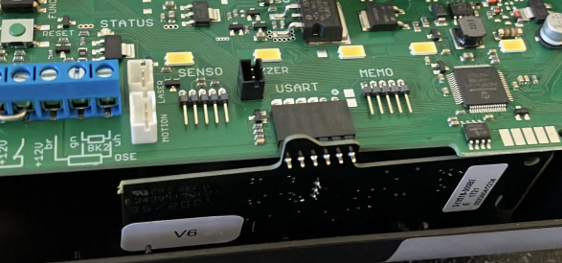
HomeLink Module
IMPORTANT: Disconnect power to the operator before installing or removing the HomeLink module.
WARNING: Install the HomeLink module exactly as shown. Incorrect installation may damage the circuit board.
The HomeLink module connects to the USART module inside the motor carriage.
- Newer HomeLink modules use a 6-pin connector.
- Older HomeLink modules use a 4-pin connector and must be installed left-aligned.
- The leftmost pin on the HomeLink module must align with the leftmost socket position on the connector.
After installation, reconnect power to the operator and verify that the HomeLink function operates correctly.
HomeLink for synoris and Direct Drive Operators
Step 1: Clear Existing HomeLink Programming (if previously programmed)
Many vehicles require existing HomeLink programming to be cleared before pairing.
- Press and hold the two outer HomeLink buttons.
- Continue holding until the indicator light changes (typically about 20 seconds).
- Release the buttons.
Note: Some vehicles may use a different reset procedure. Refer to your vehicle owner's manual if necessary.
Step 2: Put HomeLink into Programming Mode
The process differs by vehicle make and model:
- Tesla: Follow the instructions shown on the vehicle display.
- Audi: Follow the HomeLink settings within the MMI system.
- Other vehicles: Refer to your owner's manual or HomeLink support resources.
Step 3: Pair HomeLink with the Synoris Operator
- Locate the LEARN button on the operator.
- Press and release the LEARN button.
- Within 10 seconds, return to the vehicle.
- Press and hold the desired HomeLink button for approximately 2 seconds and release.
- Repeat once more.
- If necessary, repeat the procedure up to three times.
The garage door should now operate through HomeLink.
Vehicle-Specific Information
Tesla
Tesla vehicles use their own HomeLink interface. Follow the instructions displayed on the vehicle screen for programming and D-Mode activation.
Audi
Some Audi vehicles require selecting D-Mode through the MMI system. In certain models, you must rotate the control knob to access the D-Mode menu rather than pressing the knob directly.
Mercedes-Benz and BMW
Some vehicles use a HomeLink module with a multi-color LED. If standard programming does not work, follow the vehicle-specific multi-color LED procedure.
Other Vehicles
Because HomeLink procedures vary by manufacturer, model year, and software version, some vehicles may require additional steps that are not covered here.
Programming Additional Garage Door Openers With HomeLink
To program an additional device to HomeLink using a HomeLink button previously trained, follow these steps:
- Press and hold the desired pre-programmed HomeLink button. After 20 seconds the indicator light will begin to flash. Without releasing the HomeLink button, position the hand-held transmitter 1-3 inches away from the HomeLink surface keeping the HomeLink indicator light in view.
- While continuing to press the HomeLink button, now also press and hold the handheld transmitter button so that both buttons are pressed. DO NOT release either button until the HomeLink indicator light either flashes rapidly or is always on. At this point both buttons may be released (The rapid flashing or always-on led indicates successful programming).
The previous device has now been erased, and the new device can be activated by pushing the HomeLink button that has just been programmed. However, it may be necessary to follow steps 3-5 below to complete rolling code training. This procedure will not affect any other programmed HomeLink buttons. - At the garage door opener receiver (motorhead unit) in the garage, locate the training button (usually near where the hanging antenna wire is attached to the unit). If there is difficulty locating the training button, please reference the garage door opener’s manual, or visit the website www.homeLink.com.
- Press and release the training button which activates the “training” light.
NOTE: Once the button is pressed, there are approximately 30 seconds in which to initiate the next step.
Return to the vehicle and firmly press and hold the desired HomeLink button to be programmed for two seconds and release. Repeat the “press/hold/release” a second time to activate the door. (You may need to repeat this sequence up to 3 times to complete the training process).
Safety Information
Before programming HomeLink, ensure that people, pets, and objects are clear of the garage door area. The garage door may move during programming.
Do not run your vehicle inside a closed garage while programming HomeLink. Carbon monoxide can cause serious injury or death.
Only use HomeLink with garage door operators that meet applicable safety requirements and include an automatic reverse system.